Energy auditing has always been a field defined by precision — but for too long, the tools haven't kept pace. Auditors scan rooms, collect data on-site, then spend hours back at the desk manually re-entering measurements into HOT2000, wrestling with file formats, and toggling between a half-dozen apps that were never designed to talk to each other.
That's exactly the workflow Energy Intelligence was built to break.
The Problem Every Energy Auditor Knows
If you've done residential energy audits in Canada, you know the pain. You arrive on site with your tools, walk through every room, note wall dimensions, window sizes, ceiling heights, appliances. Maybe you're using a laser measure. Maybe you're sketching on paper. You get back to your desk and the real work begins — manually translating all of that into HOT2000, the NRCan simulation tool that underpins EnerGuide ratings and retrofit program submissions across the country.
It's slow. It's error-prone. And it's eating time that should be spent on analysis, reporting, and serving more clients.
Two Features Quietly Changing the Game
1. Direct .h2k Export From LiDAR Room Scans
The Energy Intelligence iOS app captures room geometry in 3D using the LiDAR scanner built into modern iPhones and iPads. Walls, floors, ceilings, windows, doors — all measured automatically with millimetre-level accuracy. But the data collection was only half the story. The real unlock is what happens next.
With one tap on the Export .h2k button, the platform generates a HOT2000-compatible .h2k file directly from your LiDAR scan data — fully populated with the building geometry, construction assemblies, HVAC configuration, occupancy data, and fuel costs your scan captured. No manual re-entry. No unit conversions. No guessing at window dimensions.
The exported file is schema-validated against HOT2000 v11.13 — the same version energy advisors are running today — and opens directly in the software ready for simulation.
⏱️ Time Saved
For an auditor running five jobs a week, this feature alone can recover several hours of desk time per audit.
2. Edit the 3D Model Directly in Your Browser
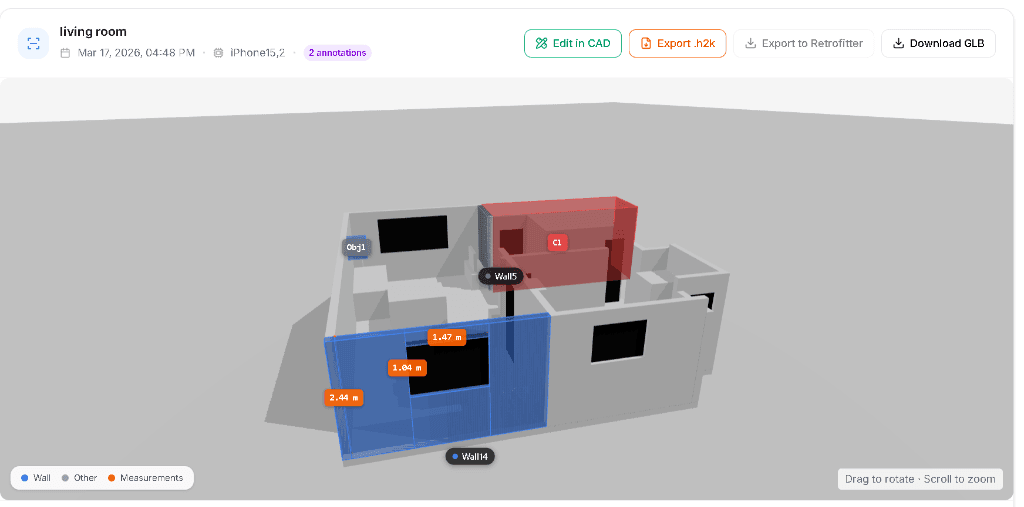
Here's where it gets powerful. Before you export, you can open the LiDAR scan in the Energy Intelligence CAD tool — a fully browser-based 3D editor built specifically for building energy work.
No software to install. No compatibility headaches between Windows and Mac. Because it runs entirely in the browser, it works identically on every platform — Chrome on Windows, Safari on Mac, Edge on a work laptop, Firefox on a personal machine. If you have a browser, you have the tool.
Inside the CAD editor, you can:
- Review the full 3D room model generated from your LiDAR scan, with walls, windows, and doors labelled and dimensioned
- Annotate walls and spaces directly on the 3D geometry — tagging construction assemblies, insulation types, and condition notes that feed into the HOT2000 export
- Adjust measurements where the scan needs refinement — unusual geometries, vaulted ceilings, additions, or spaces the phone couldn't fully capture
- Visualize push/pull extrusions to model non-standard wall configurations or additions to the base scan
- Flag components for retrofit with coloured overlays, as shown in the screenshot above — making it immediately clear which surfaces are candidates for upgrades
The result is a model that's both the working file for HOT2000 simulation and the visual record of the audit — shareable with clients, homeowners, and program administrators from a simple link.
Why Browser-Native Matters More Than You Think
Most CAD tools in the building energy space are Windows-only desktop applications. That's fine if your whole team is on Windows. But the reality of modern auditing firms — and one-person operations — is mixed: a MacBook in the field, a Windows desktop in the office, a tablet at the client's kitchen table.
Browser-native means:
- No installation — a new team member is productive from day one, no IT ticket required
- Always up to date — when we ship an update, every user gets it instantly, no manual updates or version mismatches
- Cross-platform by default — the tool behaves identically regardless of operating system
- Shareable by URL — send a client or co-worker a link to the 3D model, they open it in their browser, no account or software needed on their end
This matters especially for the retrofit programs — Greener Homes, provincial EnerGuide initiatives — where energy advisors are often working with homeowners who want to understand what was measured. Showing them a 3D model of their own house in the browser, on any device, is a fundamentally different conversation than handing them a PDF.
What the Workflow Actually Looks Like
On-site
Open the energyi iOS app, scan the room with LiDAR. The app captures wall geometry, detects windows and doors, logs appliances, and records measurements automatically.
In the browser
Review the 3D model on the Room Scans dashboard. Open the CAD editor to refine any geometry, add construction annotations, and tag surfaces for retrofit.
Export
Hit Export .h2k. A fully populated HOT2000 file is generated and downloaded — schema-valid, ready to open.
Simulate
Open the .h2k in HOT2000 on your Windows or Mac machine, run the simulation, generate the EnerGuide rating.
🚀 Result
The scan-to-simulation pipeline that used to take a full afternoon now takes minutes.
Built for Canadian Energy Advisors
Energy Intelligence is built in Newfoundland, backed by MITACS and Dal Innovates, and designed specifically for the Canadian residential energy audit market. The HOT2000 export follows the NRCan v11.13 schema precisely — the weather library, insulation codes, ventilation structure, and fuel cost blocks are all aligned with what HOT2000 expects, not approximated.
This isn't a generic building modelling tool adapted for energy work. It's energy audit software built from the ground up, with HOT2000 compatibility as a first-class requirement.
What's Coming Next
The platform is updated continuously. The next release focuses on the CAD tool, including:
- Ceiling toggle — turn ceiling geometry on and off to work with the floor plan view or the full 3D model depending on the task
- New space volume incorporation — capture and model multi-level volumes, vaulted ceilings, and split-level configurations that a single-storey model can't represent accurately
- Additional minor refinements to measurement labelling and component annotation
The Bottom Line
The combination of LiDAR room scanning, browser-based 3D editing, and one-click HOT2000 export is the most significant workflow improvement available to Canadian energy advisors right now. It removes the manual re-entry bottleneck, eliminates platform lock-in, and produces better data — because the measurements come from a sensor, not a tape measure and a handwritten notepad.
If you're an energy advisor, an auditing firm, or a retrofit program administrator looking to modernize how assessments are collected and filed, Energy Intelligence is worth a close look.
Request a Demo
See how LiDAR scanning and one-click HOT2000 export can transform your audit workflow.
energyintelligence.ai →Energy Intelligence is a full-stack building energy auditing platform based in Atlantic Canada, backed by MITACS and Dal Innovates. The platform integrates LiDAR scanning, 3D digital twin modelling, and AI-driven energy analysis for residential retrofit programs.